Create a marriage biodata in PDF Format
Marriage biodata PDF in ready-made format, Create your biodata in A4 size pdf format in less than 2 minutes, No need to format anything, just fill the form and download the pdf.
Online Marriage Biodata Maker
Fill your details and we will automatically format your marriage biodata in a beautiful and professional layout.
What Should Your Marriage Biodata PDF Include?
A marriage biodata PDF should include a brief personal introduction, relevant background details, education and work information, family context, partner preferences, and a suitable contact method. A photograph and cultural or religious details can be included if they matter to you. Keep sensitive information out of an initial introduction, and make optional fields genuinely optional.
Personal introduction
Your preferred name, age or year of birth, current city, and a few sentences about yourself.
Education and occupation
Relevant qualifications, your field of work, and any location considerations that affect future plans.
Family background
A brief description of your family, sharing only details you have permission to include.
Lifestyle and interests
Activities, routines, values, and commitments that help describe daily life with you.
Partner preferences
The qualities and practical considerations that matter, expressed respectfully rather than as demands.
Contact information
One appropriate way to get in touch, with clarity about whether you or a family member will respond.
PDF Marriage Biodata Format Sample
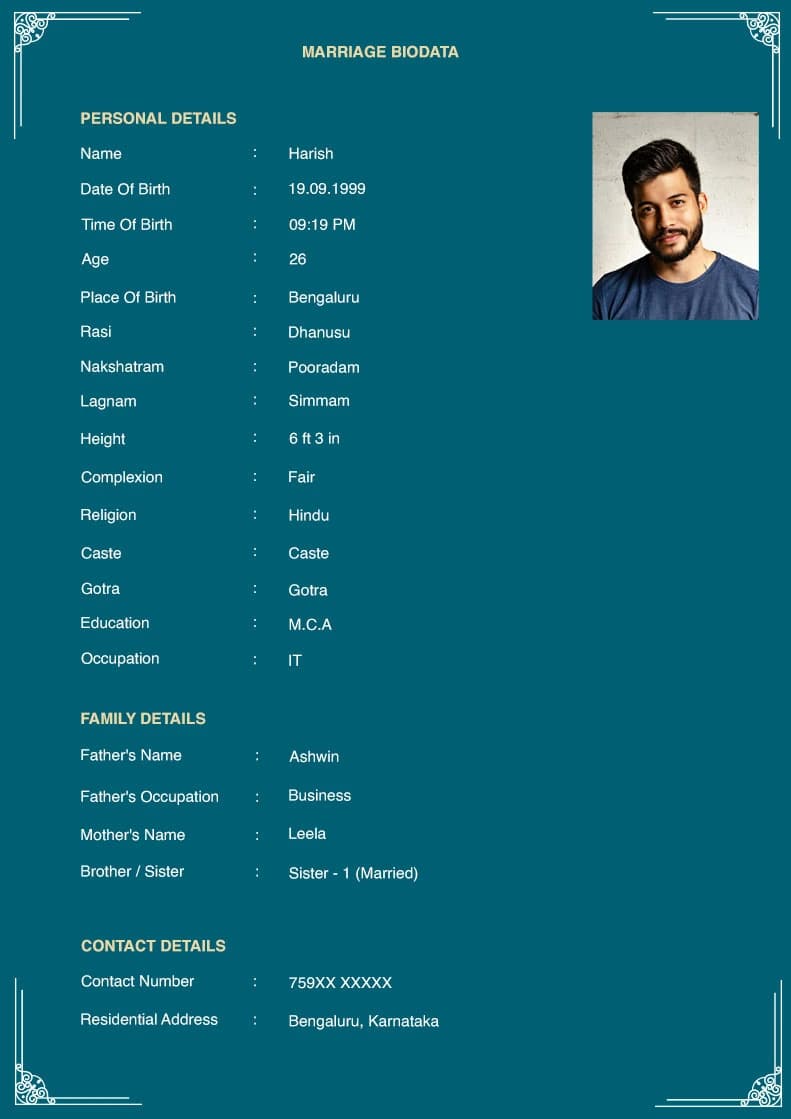
The following sample shows our popular classic traditional marriage biodata format. It neatly organizes personal, family, and contact details with photo and horoscope information in an elegant A4 layout.

MARRIAGE BIODATA

PERSONAL DETAILS
FAMILY DETAILS
CONTACT DETAILS
Let Your Personality Come Through
Your biodata for marriage can be concise without sounding impersonal. Instead of stacking adjectives such as “caring,” “ambitious,” and “family-oriented,” explain what those qualities look like in your life. A specific routine or priority gives the reader something meaningful to respond to.
For example, “I enjoy weekend walks, cooking for friends, and making time for family despite a busy workweek” says more than a list of positive traits. Use that sentence only as a model for specificity; replace it with something true about you. There is no need to present an idealized version of your lifestyle or make every interest sound impressive.
Apply the same approach to partner preferences. “I value open communication and would like to discuss where we would build our life together” invites a conversation. A long list of rigid requirements can obscure what actually matters to you, so distinguish genuine needs from details you would be happy to explore together.
If a family member is preparing your matrimonial biodata, review the final wording yourself. Check that the description reflects your voice, that your preferences are represented fairly, and that you agree with every detail being shared. Family involvement should not leave your own perspective missing from the introduction.
“Simple, humble, ambitious, caring, cultured, looking for a perfect family-oriented partner.”
“I enjoy weekend walks, cooking for friends, and making time for family. Looking for someone who values open communication and mutual respect.”
Turn Your Draft into a Share-Ready PDF
Once the content is settled, use your document editor’s export or save-as option to create the PDF. If that option is unavailable, check whether its print menu offers a PDF destination. Open the exported file rather than assuming it matches the editable document.
Follow this final review sequence:
Confirm the facts
Check names, qualifications, work details, locations, and the contact method against your current information.
Read for tone
Remove wording that feels exaggerated, overly formal, or unlike something you would say yourself.
Inspect the PDF
Look for clipped text, unexpected blank pages, misplaced images, and section breaks that interrupt reading.
Test the viewing experience
Open it on a phone as well as a larger screen, and make sure the text remains comfortable to read.
Name and store the file clearly
Use a recognizable filename, keep an editable original, and replace outdated copies when your details change.
For a marriage biodata format PDF that stays easy to maintain, keep design changes simple. Updating a city or occupation should not require rebuilding the entire document. Save the polished PDF for sharing and retain the editable version for future revisions.
Start with a Profile That Feels Like You
A well-prepared introduction gives the next conversation a useful starting point. Choose truthful details, write preferences with care, and leave space for two people to learn about each other beyond the page.